
NURBS vs Mesh Modeling: The Designer’s Complete Guide
2026-08-07
Here's a scene I've watched play out in studios more than I can count. In one corner, a designer is sculpting a futuristic SUV in ZBrush, pulling and pushing millions of polygons with the kind of freedom that feels almost like working in clay. In the other, a Class‑A surfacing specialist is building the same vehicle's hood in Alias AutoStudio, placing control points with surgical precision to achieve a reflection‑quality surface that will actually survive the tooling process.
Both are modeling the same car. Both are producing beautiful 3D data. But only one of those models is going to end up on a production line.
This tension—between design freedom and manufacturing precision—is at the heart of the NURBS vs mesh modeling debate. And if you're serious about transportation or industrial design, understanding exactly what each approach can and cannot do isn't optional. It's the difference between a portfolio piece and a production‑ready surface.
What Is NURBS Modeling?
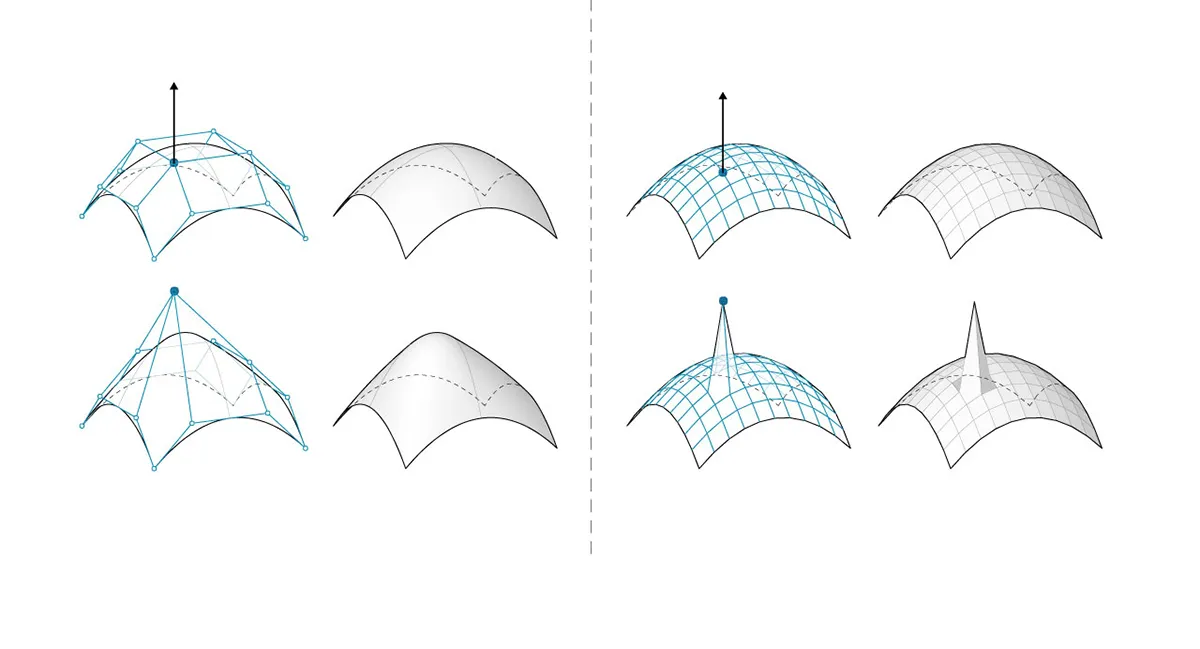
NURBS stands for Non‑Uniform Rational B‑Splines. Behind the intimidating acronym is a surprisingly elegant concept: mathematically defined curves and surfaces that can represent anything from a simple sphere to a complex automotive body panel with absolute precision.
A NURBS surface is defined by four core elements: degree (the polynomial power of the underlying math, typically 3 for automotive work), control points (which act like magnets pulling the surface into shape), knots (which control where and how the surface bends), and an evaluation rule that ties it all together. The "rational" part means the math can precisely represent conic shapes like circles and ellipses—something simpler spline formulations can't do. For those wanting to dig into the mathematical foundations, this StackExchange discussion on NURBS basis functions and this ScienceDirect paper are excellent resources, alongside this IEEE exploration of NURBS geometry.
What makes NURBS powerful is its mathematical exactness. A NURBS surface isn't an approximation of a shape; it is the shape, defined down to the sub‑micron level. Zoom in on a NURBS surface by a factor of 10,000, and it remains perfectly smooth. There's no polygon faceting, no tessellation artifacts—just pure, continuous geometry.
Surface Continuity: The Language of Quality
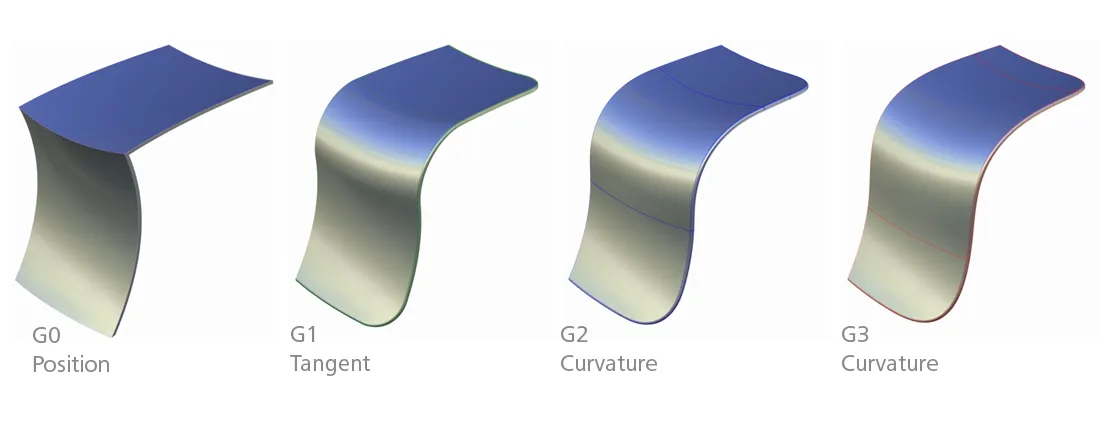
In the world of NURBS, continuity is everything. When two surfaces meet, their relationship is graded on a scale:
- G0 (Positional Continuity) : The surfaces touch at a common edge. That's it.
- G1 (Tangent Continuity) : The surfaces share the same tangent direction at the seam. Light reflects without a hard edge, but you'll still see a visible change in shading.
- G2 (Curvature Continuity) : The rate of curvature change is identical across the seam. This is the minimum standard for automotive Class‑A surfacing—the reflections flow seamlessly, and the eye perceives a single, unified surface.
- G3 (Acceleration Continuity) : Even the rate of curvature change matches. This is Formula 1–level surfacing, reserved for the most critical show surfaces.
NURBS gives you explicit, mathematically enforceable control over every level of continuity. In production automotive work, G2 is non‑negotiable. G3 is the differentiator between good and extraordinary.
What Is Mesh/Subdivision Modeling?
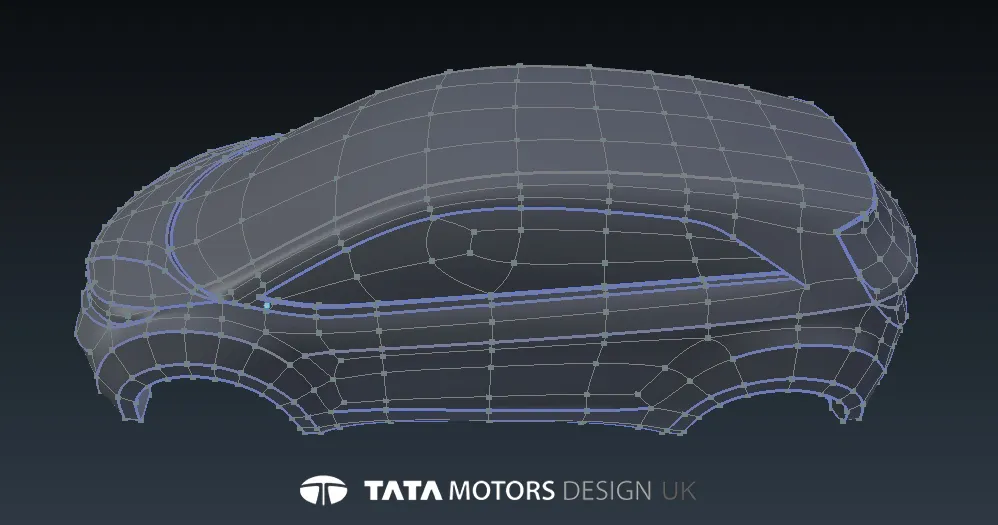
Mesh modeling is what most people picture when they think of 3D modeling: a surface built from interconnected vertices, edges, and faces (usually triangles or quads). The resolution of a mesh is fixed by its polygon count—more polygons mean more detail, but also more data.
Subdivision surface modeling (often called SubD) is a smarter version of mesh modeling. You start with a relatively low‑polygon control cage—think of it as the rough skeleton of your shape—and then apply a subdivision algorithm (most famously the Catmull‑Clark algorithm) that smooths and refines the surface. Each subdivision step increases the polygon count while rounding out the form.
SubD is how ZBrush, Blender, Maya, and 3ds Max handle smooth organic shapes. It's the foundation of almost everything you see in film, games, and digital sculpting.
How SubD Creates Smoothness
The Catmull‑Clark subdivision surface algorithm, developed in 1978 by Edwin Catmull and Jim Clark, works by taking a weighted average of existing vertex positions to calculate where new vertices should go. Run this process once, and your boxy cage becomes a softer, rounder shape. Run it two or three times, and you get a surface that looks perfectly smooth to the naked eye.
But here's the critical distinction: that smoothness is approximated through polygon density, not mathematically defined. A SubD surface is always, at its core, a mesh. It just happens to be a very dense, very cleverly arranged mesh.
Core Technical Differences: Side by Side
Precision and Manufacturing‑Readiness
NURBS produces mathematically exact surfaces. The geometry is defined by equations, not approximations. This means a NURBS model can be manufactured directly—CNC machines, stamping dies, and injection molds all rely on the precision that only mathematical surface definitions can provide.
Mesh/SubD produces tessellated surfaces. The smoothness is an illusion created by polygon density. While a dense mesh can look smooth, it's never mathematically smooth. For manufacturing, mesh data must be either converted to NURBS or used directly in applications (like 3D printing) that accept tessellated geometry.
Continuity Control
NURBS gives you explicit, controllable continuity up to G3 and beyond. You can enforce G2 across an entire vehicle body with mathematical certainty.
SubD achieves smoothness through iteration. Most SubD workflows naturally achieve G1 (tangent) continuity, but explicit G2 control is difficult—and true G3 is essentially impossible. The surface is smooth, but you can't prove it's smooth in the way manufacturing engineering requires.
Editability Philosophy
NURBS is curve‑driven and parametric. You edit by moving control points, adjusting knot vectors, and managing surface spans. It's precise but methodical—there's a reason it's called "surfacing" rather than "sculpting".
Mesh/SubD is push‑pull and organic. You grab vertices, edges, or faces and move them freely. The subdivision algorithm handles the smoothing automatically. This makes SubD dramatically faster for exploratory form‑finding.
File Output and Downstream Use
NURBS exports to STEP, IGES, and native CAD formats. These are the languages of manufacturing engineering, tooling, and production.
Mesh/SubD exports to OBJ, FBX, STL, and other polygon formats. These are the languages of rendering, games, and 3D printing.
Design Freedom vs. Precision
This is the fundamental trade‑off.
Mesh/SubD is faster for organic, exploratory form development. You can sketch in 3D with near‑zero friction, iterating through dozens of variations in the time it would take to build a single NURBS surface.
NURBS is required for validated, reflection‑critical, manufacturable surfaces. If it needs to be tooled, it needs to be NURBS.
Scalability and Resolution Independence
NURBS math holds at any zoom level. The surface has no inherent resolution—it's as smooth at 1:1 as it is at 10,000:1.
Mesh resolution is fixed by polygon density. Zoom in far enough, and you'll always see facets. To increase resolution, you must re‑tessellate—which changes the geometry.
| Feature | NURBS | Mesh / SubD |
|---|---|---|
| Precision | Mathematically exact | Approximated via polygons |
| Continuity Control | G0–G3+ explicit | G1 typical, G2 difficult |
| File Formats | STEP, IGES, CAD‑native | OBJ, FBX, STL, glTF |
| Best Use Cases | Production surfacing, tooling, aerospace | Concept sculpting, games, film, 3D printing |
| Learning Curve | Steep—requires surfacing strategy | Moderate—intuitive for artists |
| Typical Software | Alias, ICEM Surf, CATIA, Rhino | ZBrush, Blender, Maya, 3ds Max |
Where Each One Wins: Concrete Use Cases
NURBS Wins Here
- Automotive Class‑A body panels: The hood, fenders, roof, and doors of any production vehicle. Reflection quality must be flawless, and the surfaces must be toolable.
- Aerospace surfaces: Wing profiles, fuselage panels, and any component where aerodynamic performance depends on surface accuracy.
- Consumer product housings: The smooth, precision‑molded shells of laptops, phones, and appliances.
- Anything requiring true reflection quality and manufacturing tolerances: If it needs to look perfect under showroom lighting and be stamped from steel, it's NURBS.
Mesh/SubD Wins Here
- Early‑stage concept sculpting: When you're exploring form language and don't yet know what the final shape will be.
- Character and creature design: Organic, asymmetrical forms that don't need to be manufactured.
- Game assets: Real‑time rendering demands polygon efficiency, not mathematical precision.
- 3D printing of non‑manufactured objects: Prototypes, figurines, and one‑off pieces where tessellation artifacts are acceptable.
- Rapid organic form exploration: When iteration speed matters more than geometric perfection.
Where the Two Actually Meet: The Hybrid Workflow
Here's where things get interesting. The smartest studios don't choose between NURBS and SubD—they use both, in sequence, leveraging each for what it does best.
SubD‑to‑NURBS Conversion
A typical automotive design workflow might look like this:
- Sculpt the concept in SubD (ZBrush, Blender, or Alias SubD) to explore form quickly.
- Convert the SubD model to NURBS surfaces using tools like Rhino's
ToNurbscommand or dedicated plugins. - Rebuild and refine the converted surfaces in a NURBS environment (Alias, ICEM Surf, CATIA) to achieve Class‑A quality.
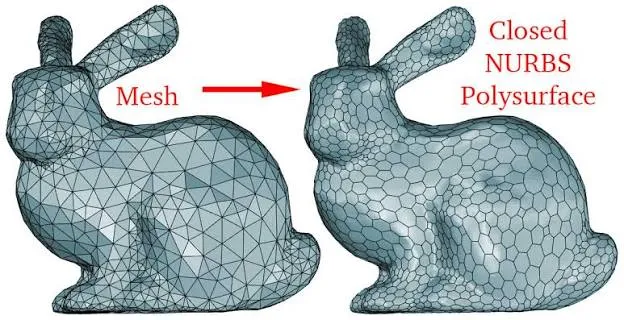
The conversion isn't magic—a SubD model doesn't automatically become a perfect NURBS surface. The resulting NURBS geometry often requires significant rebuilding to meet Class‑A standards. But the SubD model provides an invaluable reference: a 3D sketch that defines the design intent.
Scan Data as Reference
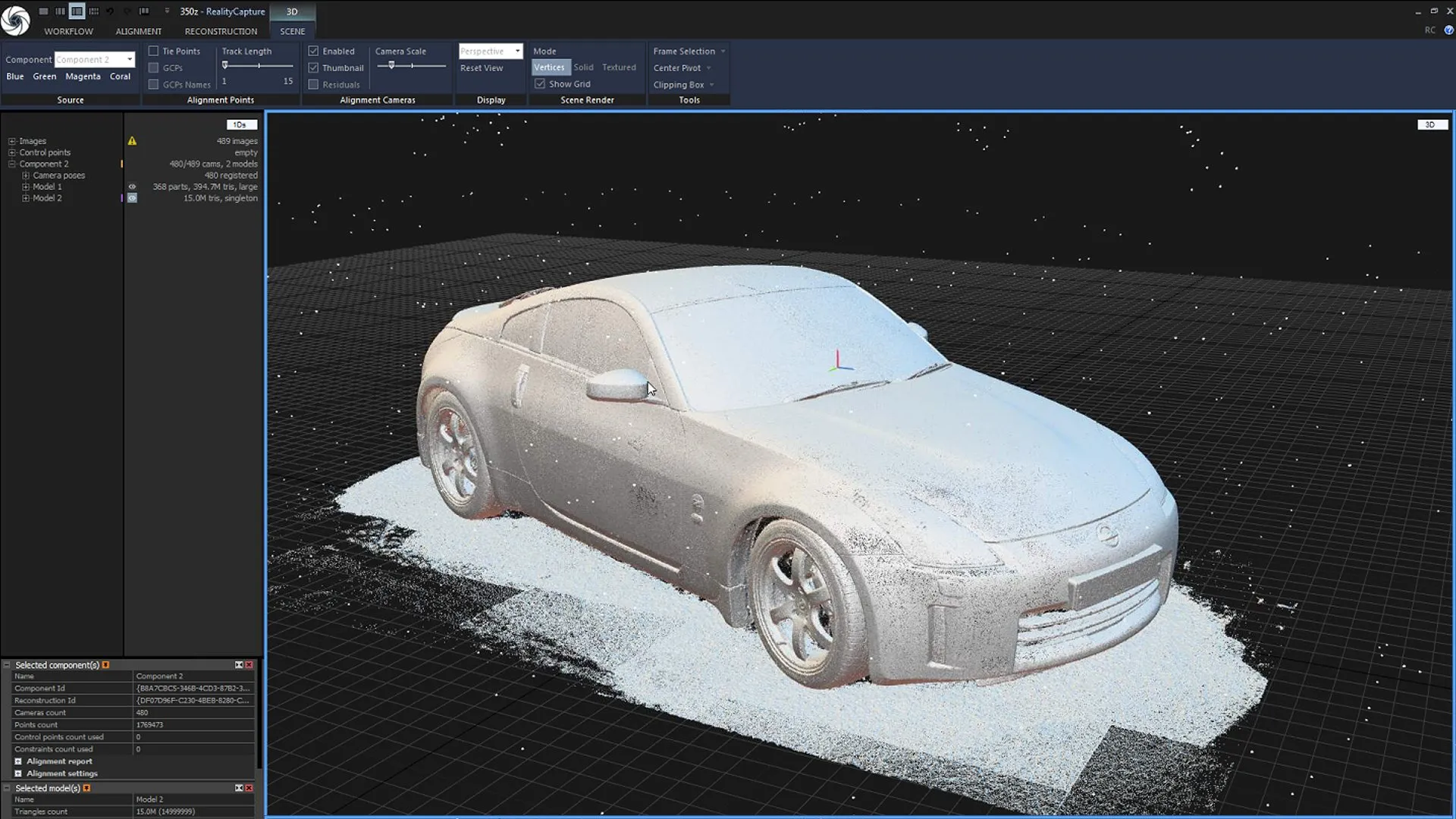
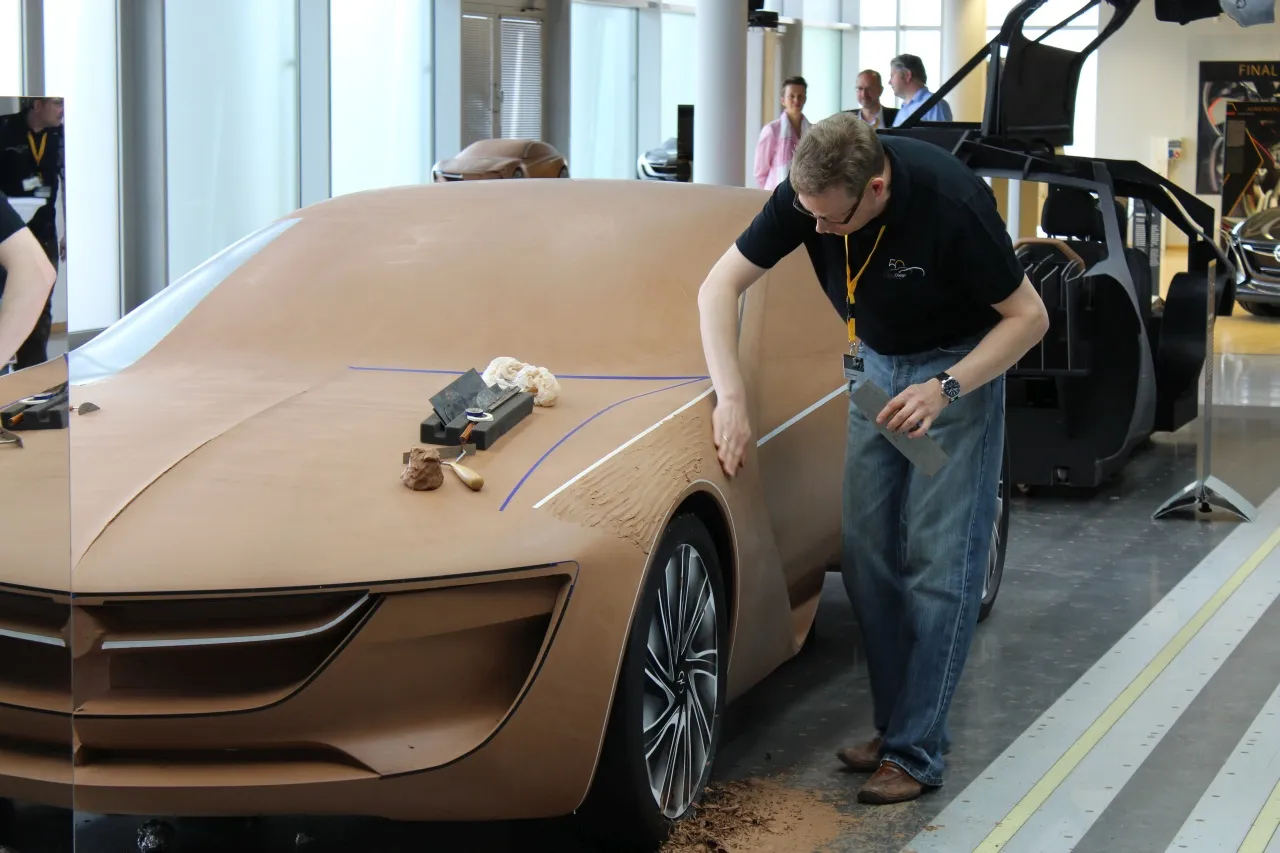
Another common hybrid approach: scan a physical clay model or prototype (producing a mesh point cloud), then use that mesh as reference geometry beneath NURBS surfacing. The mesh defines the form; the NURBS surfaces refine it for production.
Mesh Tools Inside NURBS Environments
Modern NURBS software increasingly includes SubD tool sets. Alias AutoStudio, Rhino, and CATIA all offer integrated SubD modeling capabilities, allowing designers to move between paradigms without leaving the application.
Common Misconceptions
"Mesh modeling can't be precise"
It can—for its own purposes. A dense mesh can represent a surface to within fractions of a millimeter. The issue isn't precision in an absolute sense; it's that mesh precision is discrete (tied to polygon count) while NURBS precision is continuous (mathematical). For 3D printing or visualization, mesh precision is often more than sufficient.
"NURBS is outdated and harder"
NURBS isn't outdated—it's the foundation of modern CAD for a reason. And yes, it's harder to learn than SubD, but that's because it's solving a harder problem: creating surfaces that can be manufactured. A scalpel is harder to use than a butter knife, but you wouldn't perform surgery with a butter knife.
"SubD is just low‑poly NURBS"
No. SubD is fundamentally different under the hood. A SubD surface doesn't become NURBS just because you subdivide it enough times. The underlying data structure—vertices, edges, and faces—remains polygonal.
"You can always convert SubD to NURBS later"
You can convert, but the result is rarely production‑ready without significant additional work. The conversion typically produces multi‑span surfaces that lack the clean continuity of purpose‑built NURBS. Plan for a rebuild, not a one‑click conversion.
Software Landscape
NURBS‑first tools:
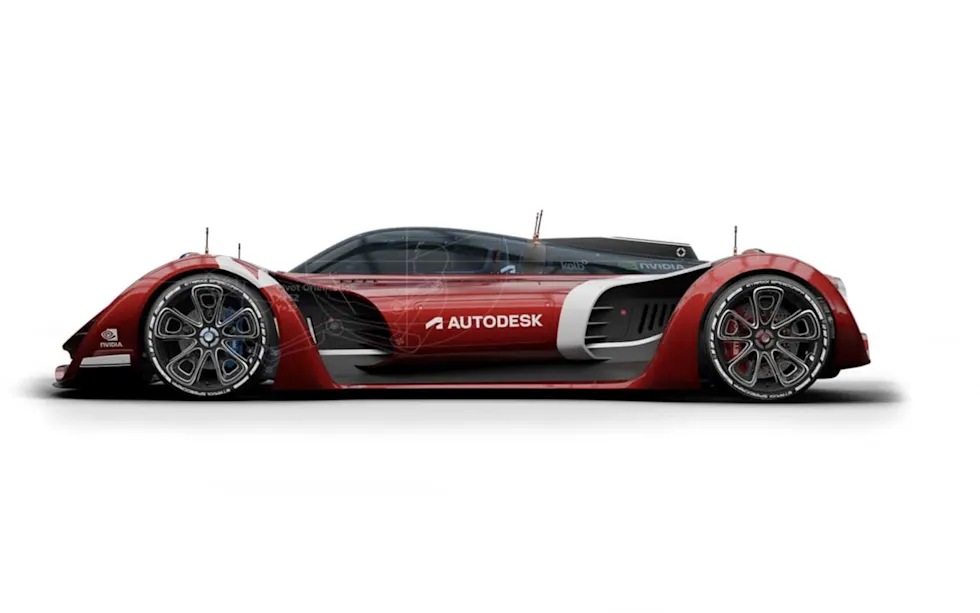
- Autodesk Alias AutoStudio — The industry standard for automotive Class‑A surfacing (learn why Alias is one of the best Class‑A tools)
- ICEM Surf — Specialized for high‑end surface creation, now integrated with CATIA
- CATIA — The dominant CAD platform in aerospace and automotive
- Rhino — Accessible NURBS modeling with a rapidly growing SubD tool set
Mesh/SubD‑first tools:
- ZBrush — The industry standard for digital sculpting
- Blender — Free, powerful, with both mesh and limited NURBS capabilities
- Maya / 3ds Max — The pillars of film and game asset creation
- Modo — Strong SubD modeling with a loyal industrial design following
How to Decide Which to Learn First
Your career direction should drive your choice:
- Automotive exterior design → NURBS‑first. Class‑A surfacing is the language of the industry. Master Alias or ICEM Surf before you touch SubD.
- Product/industrial design → NURBS‑first, with a strong secondary in SubD. Most manufactured products require NURBS for tooling, but SubD is increasingly valuable for concept development.
- Entertainment/games/character work → Mesh‑first. ZBrush, Maya, and Blender are your ecosystem. NURBS is rarely required.
- Hybrid concept‑to‑production roles → Learn SubD first for speed, then NURBS for production. The hybrid workflow is the future—and the future is already here.
Frequently Asked Questions
What's the main difference between NURBS and mesh modeling?
NURBS uses mathematical equations to define surfaces with infinite precision, while mesh modeling builds surfaces from connected polygons (vertices, edges, and faces). NURBS is used for manufacturing‑ready CAD; mesh is used for visualization, games, and digital sculpting.
Can you convert a mesh model to NURBS?
Yes, but the conversion typically produces multi‑span NURBS surfaces that require significant rebuilding to meet Class‑A standards. Tools like Rhino's ToNurbs command and various plugins can perform the conversion, but don't expect a one‑click perfect result.
Which is better for 3D printing—NURBS or mesh?
For most 3D printers, mesh (STL) is the native format. NURBS models must be tessellated into mesh before printing. However, starting from NURBS gives you more control over the tessellation quality.
What is Class‑A surfacing?
Class‑A surfacing is the highest standard of surface quality, used primarily in automotive exterior design. It requires surfaces with G2 (curvature) continuity or higher, flawless reflection quality, and mathematical precision suitable for manufacturing tooling. (For a deeper dive, see our definitive guide to Class‑A 3D modeling.)
Do I need to learn both NURBS and mesh modeling?
If you're pursuing a career in transportation or industrial design, yes. The hybrid workflow—SubD for concept exploration, NURBS for production surfacing—is becoming the industry standard.
Which software should I learn first for automotive design?
Alias AutoStudio is the industry standard for automotive Class‑A surfacing. If you're on a budget, Rhino offers a more accessible entry point with robust NURBS capabilities.
Conclusion
Here's the truth I've learned across years of production surfacing: NURBS vs mesh modeling isn't a battle—it's a partnership.
Mesh and SubD give you speed, freedom, and the ability to explore form without friction. NURBS gives you precision, continuity, and the mathematical certainty that your surfaces can actually be manufactured. One without the other leaves you either unable to iterate quickly or unable to produce toolable geometry.
The best designers I know work across both paradigms. They sculpt in SubD, refine in NURBS, and understand exactly when to switch between the two. They don't choose sides—they choose results.
At [YOUR STUDIO NAME] , I work across both worlds daily—from early concept visualization in SubD to production‑ready Class‑A surfacing in NURBS. If you're looking for surfaces that can go from sketch to showroom, let's talk.